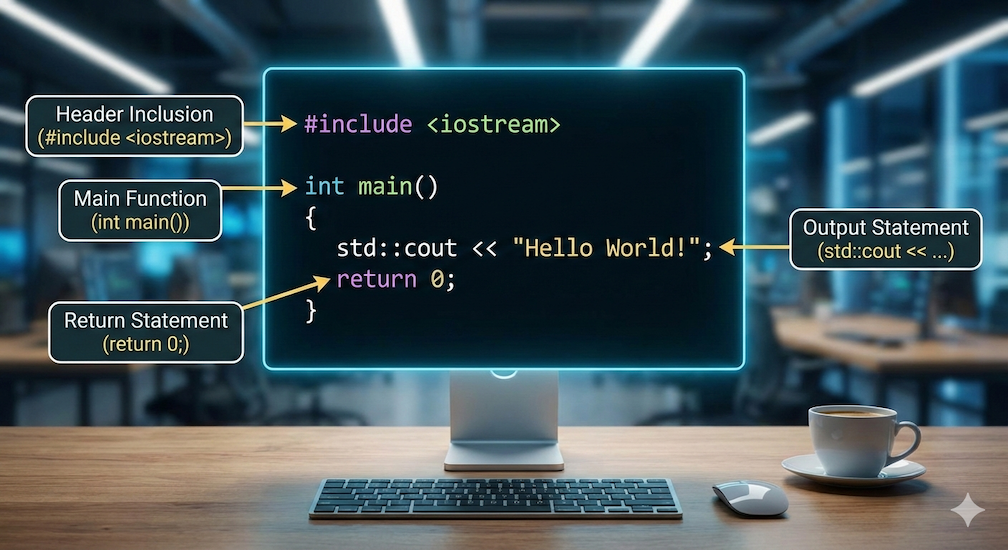
This introduction to the C++ programming language uses a simple program to teach some of the basics. I’ll be using an example from the articles on setting up a C++ programming environment (links at the end of this article). It’s a simple “Hello World” program:
#include <iostream>
using namespace std;

int main() {
    cout << "Hello, World!\n";
    return 0;
}The main() function
I would now like to discuss this small example in more detail. First, let’s look at the main() function. This function is the entry point of a C++ application. All code written within the curly braces — the function body — is executed. In this example, this is the following code:
cout << "Hello, World!\n";
return 0;Each line of code must end with a semicolon, otherwise compilation will abort with an error message.
The line return 0; means that this function returns the number 0, which is equivalent to saying “everything is OK”. The return of a value, here an integer, is indicated in the function header by specifying the data type of the value to be returned (here: int for integer) before the function name main.
In some tutorials, this Hello World example is shown without return 0;. This is not an error, because in the main() function — and only in the main() function — the return value may be omitted, even though a return value is specified before the function name main. The following code would therefore also execute without errors:
#include <iostream>
using namespace std;

int main() {
    cout << "Hello, World!\n";
}Console output
This program has only one task: to output “Hello, World!” to the console. This is made possible by cout (ccharacter output). The cout receives the string to be output via the << operator (insertion operator). The string to be output is enclosed in double quotation marks.
cout is the standard output stream. Thanks to cout, a string can be passed without having to specify how the output should be displayed. By default, this will be the console. The text to be output, “Hello World”, is followed by the characters \n and ;.
\n and endl
\n is an escape sequence. It causes a new line break (new line). Besides using \n, there is also the manipulator endl, which also creates a line break. A manipulator modifies the behavior of the output stream. In this case, it does so by creating a line break at the end of the string.
include and std
I haven’t yet addressed the first two lines of this Hello World program: #include <iostream> and using namespace std;.
include is a preprocessor directive. Here’s what it does: The source code is translated (compiled) into machine language by the compiler. Before this compilation process, the preprocessor comes into play. It searches the source code for instructions directed at it, including include directives, which are used to include other files. In this case, it’s iostream, which contains all the necessary information for cout and endl. iostream is a library that contains all the objects related to the input/output stream. In other words, if we didn’t include iostream, no text could be passed to the standard output stream via cout. Line breaks using endl would also be impossible.
Finally, let’s look at the line
using namespace std;std is a namespace, specifically representing the C++ standard library (std = standard). The definitions of cout and endl belong to this namespace. This principle is also found in other programming languages. Therefore, it’s possible to use your own cout, as long as it’s part of a different namespace.
If you don’t explicitly list the namespace — like std in this case — at the beginning of the source code, then it would be necessary to add std before the corresponding elements, followed by two colons, for example:
std::cout Because the namespace std is specified in this example, the compiler automatically searches for cout and other elements of the C++ standard library within that namespace.
Conclusion
All components of this very small program have thus been explained; and it is quite astonishing how much effort is required to output “Hello, World!”, especially when compared to Python, for example, where the following line is perfectly sufficient:
print(Hello, World!)With small programs, a high-level language like C++ inevitably involves overhead. However, this language also offers numerous advantages, such as the ability to develop cross-platform applications and its high scalability.