To represent a sequence of characters, the string data type exists in Python — just as it does in other programming languages.
Each individual character can be accessed via an index. The first character has index 0 (and not 1).
A string is a sequence of characters and each character has an index starting from
0.
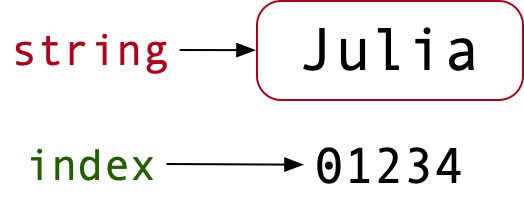
Examples of strings:
>>> town = 'Austin'
>>> name = 'Julia'
>>> programming_language = 'python'
>>> my_age = '33'Note: Double quotes can also be used. If you use Black for formatting, single quotes are converted to double quotes by default.
The number of characters can be determined using the built-in function len():
>>> name = 'Julia'
>>> len(name)
5If you want to access the first character “J” and assign it to the variable first, this can be done using the [] operator:
>>> first = Julia[0]
>>> print(first)
JSince the Index count starts at 0, the following is not possible:
name = 'Julia'
last = len(name)
print(name[last])
Traceback (most recent call last):
  File "<pyshell#7>", line 1, in <module>
    print(name[last])
IndexError: string index out of rangeThis is because the number of characters determined by len() is 6, whereas the last element has the index 5. This explains the IndexError: “string index out of range”. To access the last element, “-1” must be used instead:
>>> print(Julia[-1])
aAccordingly, the second-to-last element could be accessed using [-2].
>>> print(Julia[-2])
iString segments
In addition to accessing a single element, you can also select a segment of elements. This is known as slicing. The [] operator is used here as well. The first two letters of “Python” could be assigned to the variable s as follows:
>>> programming_language = 'Python'
>>> s = programming_language[0:2]
>>> print(s)
PySpecifying the index 0 can also be omitted:
>>> s = programming_language[:2]
PyIf you want to assign the last two characters, -2 can be used:
>>> s = programming_language[-2:]
onOr you can take the opposite approach:
>>> s = programming_language[:4]
onIterate through a string
The for loop can be used for an iteration:
>>> for i in programmin_language:
	print(i)
P
y
t
h
o
nIt is also possible to use a while loop:
>>> p = 'Python'
>>> index = 0
>>> while index < len(p):
	letter = p[index]
	print(letter)
	index += 1
P
y
t
h
o
nA string is immutable
Since a string is immutable, the following code results in an error message:
>>> programming_language = 'Python'
>>> programming_language[0] = 'H'
Traceback (most recent call last):
  File "<pyshell#1>", line 1, in <module>
    programming_language[0] = 'H'
TypeError: 'str' object does not support item assignmentThe character “P” cannot be replaced by an “H”. This results in a TypeError. The situation is different for lists, however. This is also a sequential data type, but it is mutable.